Pages

Thursday, June 28, 2012

Implementation of Page N of M in SSRS 2008 R2: Part I


Requirement:
We would need to list the employee salary in each page grouped by Department, this should follow the following criterias:
a.       After every department a page break should exists
b.      The footer should display Page N of M type of details in every page.
a.       N – Is the page number within the group
b.      M – Is the total Number of pages for that Group

Example:
Assuming we have 5 Pages of employee listing for the IT Department the Listing should show Page 1 of 5, Page 2 of 5 ..upto Page 5 of 5. If we have only 1 page for the HR department it should read Page 1 of 1.
Implementation:
1.  The following the Database Structure we are going to have and the query we are going to use.

2.       I am assuming that we have the necessary expertise in creating the dataset, going to the next step of adding a tablix to the report just by adding the necessary columns to the tablix except the department.


3.       Add department to the Row Group as shown in the figure below:

4.       Now select Dept_Description to the parent group as given here, make sure you have selected Add Group Header:


5.       We have completed the grouping of report data by Department, now your report will look like the following in the preview:


6.       We need to target our first requirement of breaking the page for each department, so select the Row group properties as given below:


7.       Select page breaks in the Group Properties window as given below:

8. Now if you see the report in Print Layout mode the report would have achieved the 1st requirement which we have outlined

We will see more about the next requirement in my next post.

Wednesday, June 27, 2012

Understanding NOSQL through Cassandra II


In continuation to my previous blog, this blog will explore the Key-Value Store working methods and its relevance with Cassandra.

Before we enter into the practical aspects of Key-Value pairs we might need to come across some technical terms with respect to Cassandra such as KeySpace, Column Family, etc., We will just go across for short time and will jump on to exploring key-value pairs concept in Cassandra.

Cassandra Key Space and Column Families:
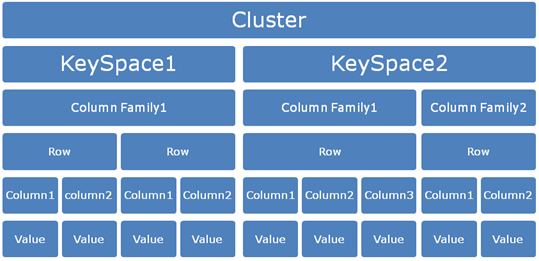
If we have database in an RDBMS system the equivalent in Cassandra is Keyspace. 


Similar to the way a database contains a group of tables; a Keyspace contains a group of Column Families or its logical namespace for a group of column families.  That brings us to a new term Column families. One keyspace can have one or more column families.

What are exactly column families?

When we say keyspace analogous with Database, Column families are analogous to tables. Column family is set of columns. In Cassandra each column family is stored in a separate file which is sorted in a row. This is a container for collection of rows.  The row key determines in which machine the data is stored.

Executing commands in Cassandra CLI:
Please note that in Cassandra all the commands will get executed only if its terminated with “;”. Pressing a return or enter key without Semicolon will expect more inputs from the end user in the CLI (Command Line Interface)


We will see practical aspects of using the same in Cassandra in my next blog.

Tuesday, June 26, 2012

Understanding NOSQL through Cassandra I


Though Cassandra has been having lot of attention these days, I was trying to get hold of some example which could be real eye opener who are very much accustomed with traditional SQL Type databases. I have tried to come across some fundamentals of NOSQL which I came across during this evaluation process of exploring Cassandra.

“Key value stores allow the application developer to store schema-less data. This data is usually consisting of a string which represents the key and the actual data which is considered to be the value in the "key - value" relationship”

Key-Value Model:
Key-Value store is one of the key elements of non-relational database systems. Cassandra is based on Key-Value Model.

We can even say it as data store of key-value pairs. If you are familiar with programming constructs in languages such as Java, C# you will understand more on Key-value models. These programming languages use the key-value model with Hashtable, Map, Hash, etc.,

Example of key-value model can be given as below:

Name: Siva
Age: 32
Location: India

On the left hand side what you have is the key and on the right hand side what you have is the value. The combination becomes Key-value pair.

Keys: Name, Age, Location
Values: Siva, 32, India

In general terminology it’s called KVP (Key-Value Pairs). So it becomes easy to query the key and retrieve the respective value. This is the reason the distributed systems use this kind of mechanism for quick retrieval of data irrespective of the data type they handle.

We will see more in the next post.

Thursday, June 21, 2012

Installing and running Cassandra Windows XP


To know more about Cassandra please check this url : http://cassandra.apache.org/. This particular guide refers to Cassandra 1.1.1.

Step:1
Visit the url http://cassandra.apache.org/download/ click the download link which will take you to the following page:


Step 2: Verify if you have java installed and configured in your PC earlier by issuing a command java –version in the command prompt.
         

Step 3: Verify the JAVA_HOME environment variable is set in your PC by using echo %JAVA_HOME% at the command prompt. If you would like to know how to set the environment variable for Java please refer to this link.


Step 4: Similarly setup the Cassandra Home as given in the picture below:


You can verify the correctness by opening a new command prompt and giving the command echo %CASSANDRA_HOME%


Step 5: Please go ahead and install the Cassandra by using the command “cassandra/bin/cassandra.bat install” to install as a service.

You will get the message “Installation of “Cassandra” is complete.

Step 6: Starting Cassandra Server, go to the command prompt and enter “Cassandra/bin/Cassandra.bat”. You will get a message “Listening for thrift clients…”


Once the server is started you can see the list of directories created under the root of the Cassandra folder automatically.


Please refer to the log file created as given below under the folder e:\var\log\Cassandra\system.log:


Step 7: Start the Cassandra Client as given below “bin/cassandra-cli --host localhost”

 Voila...You have run the Cassandra. J

Sunday, December 11, 2011

Tips for Effective Project Communication

1. Be a active listener
Listening to the discussion, meeting, telephone call with perserverance. You be the person whom you want to be at the transmitting end, so make listening a good habbit.

2. Make notes while listening
Try to make notes while listening, that helps you to recollect later once your done with your communication. Notes will be helpful to understand the aspects of communication.

3. Review and summarize
Please review the notes and sum it up. Make necessary interpretations on the understanding of the communication you had.

4. Communicate back
Communicate back your understanding, by documenting your view and interpretations. Outline the thoughts first and proof read the documents effectively.