Tuesday, December 11, 2012
Why do we need single sign on?
Many organization have many applications with different authentication mechanism making it difficult to administer because of the following reasons:
a. Need for centralizing the user administration
b. Users need not remember separate password for different apps
c. Authentication can be done from one source
The IT managers are very much concerned about the integrity of the data and they are looking at implementing the Single Sign On while seriously calculating the ROI of such implementation.
Single Sign On, provides immediate benefit of logon to multiple applications by providing a single username and password. SSO gives the end users an seamless experience of accessing the application. Administration and maintenance of their password and its relevant policy becomes much more easier to maintain too.
We can implement SSO using many ways, we will try to see the different scenarios in the Single Sign On and what are the ways we have to implement so in other article soon.


Thursday, August 9, 2012
Dependency Injection
There are too many articles and blogs around
the internet you can Google it and find the same, I would just like to share
some of the links which would be easy for beginners. When you would like to
manage lot of objects and its dependencies effectively across application you
might need to think about it.
What is Dependency
Injection?
If you want to book a Bus Ticket
to go to Chennai from Bangalore you might know lot of ways to do it e.g., book
the ticket by Redbus, booking through KSRTC website, directly going to the
private bus agents and booking it etc.,
What if you don’t want to worry
about all of these things and just tell a friend and give him money to book it.
Wouldn’t be so simple? How simple would it be to do that without you knowing the
underlying details of how your friend is going to do it? Would be awesome
right?
You have learnt Dependency
InjectionJ.
Kidding huh?
Please refer to this link this will give you good insights
on what is dependency Injection
Want to be more precise in understanding the same, please
refer to http://www.martinfowler.com/articles/injection.html
Saturday, June 30, 2012
Good resources to get started with MongoDB
In continuation to my exploration on NOSQL arena, after cassandra I'm following with Mongo DB which is much lightweight than cassandra which also follows the Document based approach. In the quest for finding more information about the same and learning it fast, I had come across some good resoruces, which you can refer too.
There are very good resources available at Mongly.com
Automated tutorial:
Very good one for anyone who would like to kickstart MongoDB without getting to know more about it. Learn MongoDB by doing through an tutorial which you can work through. Very interesting and good one too.
PDF Documents:
Learn from master themselves on the MongoDB User Manual from this link:http://docs.mongodb.org/master/MongoDB-Manual-master.pdf
Also you can check the Little MongoDB Book by Karl Seguin who has made it simple to learn MongoDB with analogous comparision with DBMS. http://openmymind.net/mongodb.pdf
Powerpoint:
Thanks to Chris Kite for sharing wondeful presentation on mongodb in this URL: http://www.slideshare.net/chriskite/intro-to-mongo-db . very good one for begineers.
Client Interaction key to success
In continuation to one of my blog on communication tips, I'm trying elaborate little to more on the aspects related to client interaction.
In our day to day to business activities irrespective of industry we tend to interact with the client or client representatives many many times. I'm just trying to put across some tips which might be useful for people who are new to client interactions.
Start the conversation by thanking him for providing his valuable time. This may not be necessary if you are meeting them often.
a. Listening what the customer says
Always listen to what the customer is trying to say, please don't run the process in back of your mind about what to respond, be patient and listen to what the customer's intent ? what is he trying to say? what are all the expectations? so on and so forth.
b. Notes very important
Make short notes of the important points you discuss with him, always try to have a pen and paper handy with you when you are meeting the customer, the customer might be giving inputs on his requirements, changes, concerns, issues while you interact. You need to take good note of that and deal it with care and communicate accordingly.
c. Make the right response
Always try to respond in patient manner, please don't commit something which you are not responsible for. Seek additional time when you are supposed to respond to such questions. You response needs to concise and precise.
d. Summarize
Try to summarize the overall conversation you had with him to outline the action items on both the ends. That will help the customer to have a clarity that you tried to understand his requirements and very caring towards your views.
Last but not the least, if you don't have the time to summarize your understanding followup him with your email outlining your understanding on the meeting.
Friday, June 29, 2012
NO SQL with Cassandra: Step by Step with Cassandra CLI
Step 1: Please navigate to
the folder in which you have installed and configured Cassandra\bin directory
in my case it is E:\software\cassandra\bin. Then please execute the batch
command Cassandra-cli


Step 3: Let us create the
Keyspace for working as “Test”

Step
4: The message will
get into an agreement with the cluster and it creates the keyspace, please
assume that keyspace is analogous to Database in RDBMS. Now let us use the
keyspace using the command “use test;”

Now
you will get a message such as Authenticated
to keyspace: test
Step 5: Creating the User
column family.

As
per the screenshot we have created the column family with the columns
full_name, email and gender.
Step 6: Now let us see how
to insert values in to these columnfamily we have just created.
In
the above given screenshot you can realize how we have inserted value to the
column family in Cassandra.

Step 7: Now let us see
how we need to read the ones which are
stored, that’s pretty simple just give List
Users;

In
this you can realize that each of it has column name, value and its timestamp. Wonderful
isn’t? Now I have added a new column called birth_year to the user kumar with
the value 1980, as given in the following:

Now
let’s list the users and see what impact it has made.

Now
it has listed two users one user with 3
column values and another user with 4 column values. hope now you have realized
how we can add columns dynamically with Cassandra.
Step 8: Let’s try and get
value for a specific user. Now you need
to user GET.

The
command will go like this GET users[‘siva’];
Step 9: We will try to retrieve
the value for specific column for the specific user’s email id.
The
command will go like this GET users[‘siva’][‘email’];

Step 10: How to delete a
particular column for the given user?

This
ends my preliminary exploration of Cassandra for NOSQL. Will try to come up
with more experiments in the upcoming days. Thanks.
Thursday, June 28, 2012
Implementation of Page N of M in SSRS 2008 R2: Part I
Requirement:
We would need to list the
employee salary in each page grouped by Department, this should follow the
following criterias:
a.
After every
department a page break should exists
b.
The footer should
display Page N of M type of details in every page.
a.
N – Is the page
number within the group
b.
M – Is the total
Number of pages for that Group
Example:
Assuming we have 5 Pages of
employee listing for the IT Department the Listing should show Page 1 of 5,
Page 2 of 5 ..upto Page 5 of 5. If we have only 1 page for the HR department it
should read Page 1 of 1.
Implementation:
1. The following the
Database Structure we are going to have and the query we are going to use.

2.
I am assuming
that we have the necessary expertise in creating the dataset, going to the next
step of adding a tablix to the report just by adding the necessary columns to
the tablix except the department.

3.
Add department to the Row Group as shown in the
figure below:


4.
Now select Dept_Description to the parent group
as given here, make sure you have selected Add Group Header:

5.
We have completed the grouping of report data by
Department, now your report will look like the following in the preview:

6.
We need to target our first requirement of breaking the page for each department, so
select the Row group properties as given below:

7.
Select page breaks in the Group Properties
window as given below:

8. Now if you see the report in Print Layout mode
the report would have achieved the 1st requirement which we have
outlined

We will see more about the next requirement in my next post.
Wednesday, June 27, 2012
Understanding NOSQL through Cassandra II
In continuation to my
previous blog, this blog will explore the Key-Value Store working methods and its
relevance with Cassandra.
Before we enter into the
practical aspects of Key-Value pairs we might need to come across some
technical terms with respect to Cassandra such as KeySpace, Column Family,
etc., We will just go across for short time and will jump on to exploring
key-value pairs concept in Cassandra.
Cassandra Key Space and Column Families:
If we have database in an RDBMS system the equivalent in Cassandra is
Keyspace.
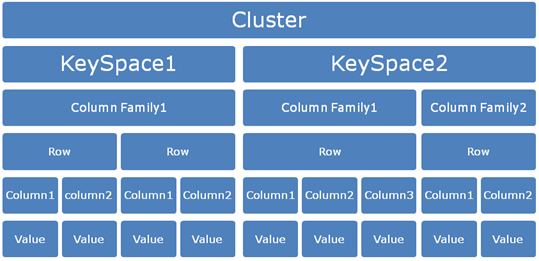
Similar to the way a database contains a group of tables; a Keyspace
contains a group of Column Families or its logical namespace for a group of
column families. That brings us to a
new term Column families. One keyspace can have one or more column families.
What are exactly column families?
When we say keyspace analogous with Database, Column
families are analogous to tables. Column family is set of
columns. In Cassandra each column family is stored in a separate file which is
sorted in a row. This is a container for collection of rows. The row key determines in which machine the
data is stored.
Executing commands in Cassandra CLI:
Please note that in Cassandra
all the commands will get executed only if its terminated with “;”. Pressing a return or enter key
without Semicolon will expect more inputs from the end user in the CLI (Command
Line Interface)
We will see practical aspects of using the same in Cassandra in my next blog.
We will see practical aspects of using the same in Cassandra in my next blog.
Tuesday, June 26, 2012
Understanding NOSQL through Cassandra I
Though Cassandra has been having lot of attention these
days, I was trying to get hold of some example which could be real eye opener
who are very much accustomed with traditional SQL Type databases. I have tried
to come across some fundamentals of NOSQL which I came across during this
evaluation process of exploring Cassandra.
“Key value stores allow the
application developer to store schema-less data. This data is usually
consisting of a string which represents the key and the actual data which is
considered to be the value in the "key - value" relationship”
Key-Value Model:
Key-Value store is one of the key elements of non-relational
database systems. Cassandra is based on Key-Value Model.
We can even say it as data store of key-value pairs. If you
are familiar with programming constructs in languages such as Java, C# you will
understand more on Key-value models. These programming languages use the key-value
model with Hashtable, Map, Hash, etc.,
Example of key-value model can be given as below:
Name: Siva
Age: 32
Location: India
On the left hand side what you have is the key and on the
right hand side what you have is the value. The combination becomes Key-value
pair.
Keys: Name, Age, Location
Values: Siva, 32, India
In general terminology it’s called KVP (Key-Value Pairs). So
it becomes easy to query the key and retrieve the respective value. This is the
reason the distributed systems use this kind of mechanism for quick retrieval
of data irrespective of the data type they handle.
We will see more in the next post.
Thursday, June 21, 2012
Installing and running Cassandra Windows XP
To know more about Cassandra please check this url : http://cassandra.apache.org/. This particular guide refers
to Cassandra 1.1.1.
Step:1
Visit the url http://cassandra.apache.org/download/
click the download link which will take you to the following page:

Step 2: Verify if you have java installed and configured in your PC
earlier by issuing a command java
–version in the command prompt.

Step 3: Verify the JAVA_HOME environment variable is set in your PC
by using echo %JAVA_HOME% at the
command prompt. If you would like to know how to set the environment variable
for Java please refer to this link.

Step 4: Similarly setup the Cassandra Home as given in the picture
below:

You can verify the correctness by
opening a new command prompt and giving the command echo %CASSANDRA_HOME%

Step 5: Please go
ahead and install the Cassandra by using the command “cassandra/bin/cassandra.bat install” to
install as a service.

You will get the message “Installation of “Cassandra” is
complete.
Step 6: Starting
Cassandra Server, go to the command prompt and enter “Cassandra/bin/Cassandra.bat”. You will get a message “Listening for thrift clients…”

Once the server is started you can see the list of directories
created under the root of the Cassandra folder automatically.

Please refer to the
log file created as given below under the folder e:\var\log\Cassandra\system.log:

Step 7: Start the
Cassandra Client as given below “bin/cassandra-cli
--host localhost”

Voila...You have run the Cassandra. J
Sunday, December 11, 2011
Tips for Effective Project Communication
1. Be a active listener
Listening to the discussion, meeting, telephone call with perserverance. You be the person whom you want to be at the transmitting end, so make listening a good habbit.
2. Make notes while listening
Try to make notes while listening, that helps you to recollect later once your done with your communication. Notes will be helpful to understand the aspects of communication.
3. Review and summarize
Please review the notes and sum it up. Make necessary interpretations on the understanding of the communication you had.
4. Communicate back
Communicate back your understanding, by documenting your view and interpretations. Outline the thoughts first and proof read the documents effectively.
Listening to the discussion, meeting, telephone call with perserverance. You be the person whom you want to be at the transmitting end, so make listening a good habbit.
2. Make notes while listening
Try to make notes while listening, that helps you to recollect later once your done with your communication. Notes will be helpful to understand the aspects of communication.
3. Review and summarize
Please review the notes and sum it up. Make necessary interpretations on the understanding of the communication you had.
4. Communicate back
Communicate back your understanding, by documenting your view and interpretations. Outline the thoughts first and proof read the documents effectively.
Saturday, November 5, 2011
Need for Project
Many times we don't know or analyze why we do certain things? Later on we analyze those. Many times we are part of the project we do our daily work on the project but we never bothered to ask why do this project? Whats the reasoning behind the project. Petty isn't?
In this blog we will discuss on the various reasoning behind the project according to PMI and also we will see some examples of the same. The below given picture represents my own way of seeing the reasoning behind a project:

We will see more about these needs with some examples. Keep visiting.
In this blog we will discuss on the various reasoning behind the project according to PMI and also we will see some examples of the same. The below given picture represents my own way of seeing the reasoning behind a project:

We will see more about these needs with some examples. Keep visiting.
Monday, August 29, 2011
Risk & Issues: The big confusion
Risk Vs Issues:
Many time I have asked this question to myself on the difference between risk and issues. Hence this article.
How risk can be quantified?
risk=probability of event x cost of event
Managing risk is one of the important part of the project management. In an generic term Issue and Risk may look closer but they are not. Risk is always considered to be an potential problem and should be monitored throught out the lifecycle of the program/project.
Characteristics of risk:
a. It can have an cause(Requirement/Assumption/Constraints/Condition).
b. It can have an impact which may be Positive or Negative
c. It can have an severity level attached to it.
d. It should have an timeline in which it expires.
When an risk becomes an issue?
When the risk increases it becomes an issue and special action item is required on it. Risk has to be monitored carefully so that it has to be moved from the state of Risk to Issue and take necessary action on the same.
So to be more clear Issue is an risk which has occured or materialized.Issue on the otherhand could be an occurance of risk already defined. Its gap identified between the action/execution on the stakeholder expectations.
Key Differentiators:
Many time I have asked this question to myself on the difference between risk and issues. Hence this article.
How risk can be quantified?
risk=probability of event x cost of event
Managing risk is one of the important part of the project management. In an generic term Issue and Risk may look closer but they are not. Risk is always considered to be an potential problem and should be monitored throught out the lifecycle of the program/project.
Characteristics of risk:
a. It can have an cause(Requirement/Assumption/Constraints/Condition).
b. It can have an impact which may be Positive or Negative
c. It can have an severity level attached to it.
d. It should have an timeline in which it expires.
When an risk becomes an issue?
When the risk increases it becomes an issue and special action item is required on it. Risk has to be monitored carefully so that it has to be moved from the state of Risk to Issue and take necessary action on the same.
So to be more clear Issue is an risk which has occured or materialized.Issue on the otherhand could be an occurance of risk already defined. Its gap identified between the action/execution on the stakeholder expectations.
Key Differentiators:
| Sno# | Risk | Issues | ||||||
| 1 | It may occur or may not | Always current | ||||||
| 2 | They are uncertain in nature | It exists | ||||||
| 3 | Can be mitigated, enhanced or avoid | Not possible to do so, you have to resolve it | ||||||
| 4 | Needs an risk response and mitigation plan | Requires immediate action |
Sunday, May 15, 2011
My Blog disclosure policy
This policy is valid from 16 May 2011
This blog is a personal blog written and edited by me. This blog does not accept any form of advertising, sponsorship, or paid insertions. We write for our own purposes. However, we may be influenced by our background, occupation, religion, political affiliation or experience.
The owner(s) of this blog will never receive compensation in any way from this blog.
The owner(s) of this blog is not compensated to provide opinion on products, services, websites and various other topics. The views and opinions expressed on this blog are purely the blog owners. If we claim or appear to be experts on a certain topic or product or service area, we will only endorse products or services that we believe, based on our expertise, are worthy of such endorsement. Any product claim, statistic, quote or other representation about a product or service should be verified with the manufacturer or provider.
This blog does contain content which might present a conflict of interest. This content may not always be identified.
To get your own policy, go to http://www.disclosurepolicy.org
This blog is a personal blog written and edited by me. This blog does not accept any form of advertising, sponsorship, or paid insertions. We write for our own purposes. However, we may be influenced by our background, occupation, religion, political affiliation or experience.
The owner(s) of this blog will never receive compensation in any way from this blog.
The owner(s) of this blog is not compensated to provide opinion on products, services, websites and various other topics. The views and opinions expressed on this blog are purely the blog owners. If we claim or appear to be experts on a certain topic or product or service area, we will only endorse products or services that we believe, based on our expertise, are worthy of such endorsement. Any product claim, statistic, quote or other representation about a product or service should be verified with the manufacturer or provider.
This blog does contain content which might present a conflict of interest. This content may not always be identified.
To get your own policy, go to http://www.disclosurepolicy.org
Sunday, April 17, 2011
Effort Estimation: How long its going to take?
During our development efforts or Project management times, we would have come across this question "How long its going to take?" In this blog I'm trying to discuss the concept of "Three point Estimation".
What is Three Point Estimation?
Three point estimate is best suitable for IS Application projects and it takes into account best, worst and most likely scenarios. This is based on the statistical tools.
The Scenarios for Estimation:
a. Most Optimistic - Best Scenario (Mo)
b. Most Pessimistic - Worst Scenario (Mp)
c. Most Likely - Likely to happen Scenario (Ml)
Steps to Three Point Estimation:
Example:
How long it will take to develop the screen to add two numbers?
a. Mo - 5 Hours
b. Mp - 10 Hours
c. Ml- 8 Hours
Thought it can be calculated by Simple Mean which is called as Triangular Method using the formula (Mo+Mp+Ml)/3, thats not most recommended, so we go with PERT based calculation as follows.
E = (Mo+4Ml+Mp)/6
E=(5 + (4 * 8) + 10)/6=(5 + 32 + 10)/6=47/6=7.8
SD = (Mp - Mo)/6=(10-5)/6=5/6=0.8
Benefits:
1. Simple to work on the estimation, would take lesser time to estimate
2. Provides opportunity to consider best, worst and modest scenarios
3. Degree of uncertainty is also documented
4. There are no un-interpreted estimates.
Various links you can refer fore more details:
http://www.projects.ed.ac.uk/methodologies/Full_Software_Project_Template/EstimationGuidelines.shtml
http://en.wikipedia.org/wiki/Three-point_estimation
What is Three Point Estimation?
Three point estimate is best suitable for IS Application projects and it takes into account best, worst and most likely scenarios. This is based on the statistical tools.
The Scenarios for Estimation:
a. Most Optimistic - Best Scenario (Mo)
b. Most Pessimistic - Worst Scenario (Mp)
c. Most Likely - Likely to happen Scenario (Ml)
Steps to Three Point Estimation:
- Develop an Work Breakdown Structure
- Define the Mo, Ml and Mp efforts required with the help of spreadsheet
- Estimates each the E value and SD for each task.
Example:
How long it will take to develop the screen to add two numbers?
a. Mo - 5 Hours
b. Mp - 10 Hours
c. Ml- 8 Hours
Thought it can be calculated by Simple Mean which is called as Triangular Method using the formula (Mo+Mp+Ml)/3, thats not most recommended, so we go with PERT based calculation as follows.
E = (Mo+4Ml+Mp)/6
E=(5 + (4 * 8) + 10)/6=(5 + 32 + 10)/6=47/6=7.8
SD = (Mp - Mo)/6=(10-5)/6=5/6=0.8
Benefits:
1. Simple to work on the estimation, would take lesser time to estimate
2. Provides opportunity to consider best, worst and modest scenarios
3. Degree of uncertainty is also documented
4. There are no un-interpreted estimates.
Various links you can refer fore more details:
http://www.projects.ed.ac.uk/methodologies/Full_Software_Project_Template/EstimationGuidelines.shtml
http://en.wikipedia.org/wiki/Three-point_estimation
Thursday, February 17, 2011
Setting our project objectives - III
In my previous posts we have discussed on what is project objectives and how to set them up using SMART. In this post we will see how the concept DISCO would be applicable in setting project objectives.
Rationale:
When we move on to create an project objectives, its not only we should get convinced about our ideas but also our team. Its then the synergy is created to work towards the goals/objectives together. The concept of DISCO advocates the strategy more similar to SMART but with more emphasis on team work.
DISCO:

Detail Specifics:
Rationale:
When we move on to create an project objectives, its not only we should get convinced about our ideas but also our team. Its then the synergy is created to work towards the goals/objectives together. The concept of DISCO advocates the strategy more similar to SMART but with more emphasis on team work.
DISCO:

Detail Specifics:
- Be specific on what you want.
- Probably have an work breakdown structure.
- Help the team members to understand the specific you understood.
Include Qualitative and Quantitative Measurements:
- When you start setting the objectives check whether its measurable or not.
- Ensure you have the following characteristics towards Qualitative and Quantitative measurements:
- Qualitative: Measurable by standards (Defect Ratio, KPIs) more towards Quality
- Quantitative: Resources, Timelines, Budget related measures
Seek Consensus:
- Always seek consensus from your team on the objectives
- You can force the team to follow your objectives until or otherwise they have the buy-in on your objectives
- Seek to be understood and also make others understand
Creating Reasonable approach:
- Be reasonable and justifiable on your approach
- Don't set unrealistic targets and later on postponing them
- There is a possibility of conflict in this area because perspective changes among people
Operate in methodical time frame:
- Always have time strings attached to your objectives
- Let the entire team be aware about the timelines
- Create an schedule around the timelines
Example of such objective:
a. Creation of an micro controller based Attendance tracking system with in 2 months which includes key functionalities such Swipe Cards, Daily Attendance Reports and Solar powered system with defect ration <5%.
Saturday, February 12, 2011
Setting our project objectives - II
In my previous blog we saw about the difference between goals and objectives and how they are significant. So the typical two areas in general people suggest about setting objectives are
a. SMART
b. DISCO
We will see about SMART in this Blog:

a. SMART
S - Specific M- Measurable A-Achievable R - Realistic and T - Timebound
In my next blog we will discuss about DISCO, even though they are very similar to SMART having an exposure to the same would give an alternate perspective.
a. SMART
b. DISCO
We will see about SMART in this Blog:

a. SMART
S - Specific M- Measurable A-Achievable R - Realistic and T - Timebound
Specific:
So any objectives we have must be specific and focussed. It needs to be well articulated and clear to the point. Otherwise we can use the term "well defined". Probably the the following questions would help in doing the same: "What", "Why","Who", "When","Where", "How".
Measurable:
If you are objectives are not measurable how you will determine that you have actually achieved that. An measurable objective will help you to tell whether you are in the right path because its measurable.
Achievable:
There could be resource constraints, time constraints and many constraints which may make your task unachievable, so before determining your objective you decide whether its achievable or not. There is no point in having an objective which is not at all achievable.
Realistic:
The objectives should be in context with your goals. Its cannot be maligned with the goals. Its critical that your objectives are falling in line with your expectations of your goals fulfillment.
Time bound:
Any objective should be time bound, if it is not probably you have would not make any significant impact on your goals. Ensure your objective is having an deadline to achieve. If not achieve review the date, but having an objective without an specific deadline is dangerous.
Subscribe to:
Posts (Atom)